
How to Choose a Website Platform as a Travel Advisor (Without Losing Your Mind)
Blog Overview: A comparison of most website options a travel advisor is likely to run into, from travel-specific platforms like Travefy and Truevail to website builders like Squarespace, Showit, and WordPress, plus the quick-fix options like Canva and Carrd. We'll cover what each one actually costs (USD and approximate CAD), what you own versus what you're renting, SEO, ease of use, and how to figure out what makes sense for where you are right now. [Approx. read time: 10 minutes]
Note: all pricing is as of April 2026
What We cover in this post
What Does Your Website Need to Do?
Popular Travel Industry Specific Website Platforms
Owning vs Renting Your Website
Common Website Builders
What Your Choice Means for SEO
Cost Summary
How to Show Up When You Can’t Afford a Website
Where to Go Next
You've asked around. You probably shouldn't have, now you’re more confused than ever.
Someone in your host agency's chat is using the free template that came with their membership. Someone at a networking event swore by Squarespace. A colleague mentioned Travefy does websites now. An advisor you follow online has a Showit site so gorgeous you've visited it three separate times just to stare at it. And somewhere in a thread you can't find anymore, someone said to ‘just use Canva.’
So now you've got six browser tabs open and a notes app full of platform names. Meanwhile, your current website (or lack of one) is out there doing absolutely nothing useful every time a referral Googles you.
That hesitation you feel when you share your URL with a potential client? That's not a small thing. It's your gut telling you that what they're seeing doesn't match what you actually deliver, and that disconnect has a cost you never get to measure. The clients who land on your site and can't immediately tell what you do or why you're worth it — they move on to someone whose online presence made the decision easier. You never hear from them. You don't even know they were looking.
Settle in, and let's sort through this. Not a 'top 10 platforms ranked!' listicle. It’s an honest look at what each option does, what it costs, and what it means for your business a year or three from now.
💡 But first - if you need a Glossary of Website Jargon - click here.
Before We Talk Platforms: What Do You Need Your Website To Do?
This matters more than most advisors realize, because there are two genuinely different jobs a travel advisor website can do, and not every platform handles both.
The first is a marketing site: the thing that communicates who you are, what you specialize in, why you're worth hiring, and how to get in touch. This is what attracts new clients, builds trust before a discovery call ever happens, and does the heavy lifting you're currently doing manually on every single inquiry. If you've ever spent the first twenty minutes of a call explaining your process and justifying your fees, this is the missing piece (as is my Welcome Guide template).
The second is an operational hub: somewhere clients submit intake forms, access itineraries, book consultations, or find logistical details. A workflow tool with a public-facing side.
Most travel-specific platforms lean hard into the workflow side (Travefy, Travel Joy, Tern). Most general website builders handle the marketing side well, but leave the operations to integrations ($). That's totally fine, but if you walk into a platform decision without knowing which problem you're actually trying to solve, you'll end up paying for tools you don't use and missing the ones you need.
Popular Travel-Industry-Specific Website Options
Travefy
Travefy is primarily an itinerary builder, and now a CRM, that also happens to include a website and landing page builder. It's been the #1 itinerary tool among travel advisors for several years running, and that reputation is deserved. The itinerary side is genuinely excellent.
The website part? Think of it as a bonus feature, not the main event. It's clean and functional, but it's designed to give you a web presence, not a strategic marketing site that answers the questions your potential clients are silently asking before they ever reach out.
Pricing (USD):
The Core plan runs ~$39 USD/month billed monthly, or ~$32 USD/month billed annually (~$44–53 CAD/month depending on exchange). There's a New Travel Agent Program at $25 USD/month for people just starting out. The Premium plan, which adds custom domain hosting and priority support, is ~$59 USD/month or ~$48 USD/month annually. All pricing in USD.
What's actually useful:
The CRM and itinerary tools are the real value. If you're already paying for Travefy for those reasons, the web presence comes along for the ride, and that's a reasonable deal. The platform genuinely understands how advisors work.
What to know:
The design customization is limited; I believe there are 4 templates to choose from. SEO control is minimal (no blog, site structure, schema markup, etc.), and if you ever leave Travefy, the website goes with it. Every URL you've shared, any Google traction you've slowly built up, is gone. You don't own anything you've built there except the words you've written.
This is the part that many don’t think about. You can invest years building content and sending people to a Travefy URL, and the moment you switch platforms, you're starting from zero. (More on why that matters in the ownership section below.)
The CRM question:
A lot of advisors wonder whether having their website and CRM in the same place is worth it. On paper, the all-in-one appeal makes sense. In practice, you're locking your entire online presence to a platform you chose for its itinerary tools. If the website side doesn't do what you need it to do, from an SEO perspective or a conversion perspective, bundling isn't saving you anything. It's just making it harder to leave.
Right for you if:
You need a CRM and itinerary tool, and want a polished client experience with a basic web presence bundled in. Not the right call if you’re focused on personal branding, positioning and enhancing your visibility in search results.
Truevail
Truevail is a done-for-you marketing platform built for travel advisors. Website, newsletters, social media content, all managed for you. If you've ever thought I just want someone else to handle this entire thing, Truevail is built for exactly that feeling.
Pricing (USD):
Website hosting and management starts at $49 USD/month for both single-page and 7-page sites. Website design is a separate one-time fee from $299 USD for a single page, $699 USD for the full 7-page site. Their FAQ also references $99 USD/month for hosting bundled with access to the full marketing platform (newsletters, social media content), so the monthly cost depends on which services you're using. All pricing in USD.
What's actually useful:
It's genuinely turnkey. The content creation is handled, the aesthetic is polished, and they've built the platform specifically around the luxury travel market. If your main problem is inconsistency, if you know you should be sending newsletters and posting content, but it just never happens, Truevail solves that specific problem.
What to know:
You start with one of their templates (not custom) and have limited control over the design. The site lives on their proprietary platform. If you cancel, the website goes offline. Their own FAQ says it directly: the site is not transferable to other hosting services, and you essentially start over if you want to move hosts. That’s not to say you can’t manually set up URL redirects, but without controlling the infrastructure, like with a WordPress migration, it may not go smoothly.
In addition, the content is professional but distributed across their advisor network, which means your marketing voice isn't quite yours, and differentiating your brand from other advisors using the same service gets harder the more of you there are.
Right for you if:
You want to show up consistently and professionally online without doing the work yourself and/or a larger upfront payment, and you're genuinely okay with polished over distinctive. Just be honest with yourself about what you're renting versus what you're building. This is like a fancy car you lease and then give back when you’re done.
Your Host Agency's Provided Site
About 65% of host agencies offer some kind of website program to their advisors. It's fast, it's often cheap or free, and it gets you something up quickly.
The problem isn't the website itself, although the scope of visibility varies and most are generic and don't differentiate YOU at all from your host and the sea of other advisors they support. The main problem is ownership. Leave your host, and the site leaves too. Every URL you've shared, every piece of Google traction you've built under that address, broken and gone. And because you're typically on a shared template with hundreds/thousands of other advisors under the host's domain, Google isn't going to rank a subdomain of someone else's URL for 'luxury travel advisor Winnipeg.' That SEO value isn't building for you.
In my opinion, Fora does this best. Their branding is premium, and each advisor has their own page and can contribute to the Fora blog. It's a starting point, not a foundation.
The Part That Matters Most: Owning Your Site vs Renting It
This is the section I wish more advisors read before they pick a platform, not after they've been on one for two years and need to switch.
Always own your domain
Whatever platform you use, your domain should be registered in your name, paid for by you, and controlled by you. Not your host. Not your platform. You. Your domain is your address on the internet. If someone else holds the deed, they can take it. And honestly, the same for your website host. I’ve seen horror stories of developers holding clients’ domains and WordPress sites hostage under their name. You should be the owner of what you paid for.
Platform dependency is a real risk
With Travefy, Truevail, or a host-provided site, your website lives on their infrastructure. Leave the platform, and you leave the site behind. That includes every URL your clients have bookmarked, any backlinks pointing to your content, and whatever SEO equity you've slowly been building underneath it all.
Some platforms let you build equity. Others let you rent a presence.
A site you build on Squarespace, Showit, or WordPress accumulates real value over time: domain age, indexed pages, backlinks, search authority. A subscription-platform site is a monthly bill with no equity building underneath it. That's not always the wrong trade-off, but it should be a trade-off you're making on purpose, not one you discover three years in when you want to move.
The things that compound over time: your domain, your email list, and your Google indexing history. Build all three on ground you own.


The Common Website Builders
Squarespace
Squarespace is the one I recommend to most travel advisors who want to maintain their own site without becoming a web developer in the process. Not the flashiest answer. Usually the right one. And of course, this is also where I design, but I’m writing this as unbiased as possible. This is not a one-size-fits-all answer.
Pricing (USD, billed annually):
Basic ~$16 USD/month, Core ~$23 USD/month, Plus ~$39 USD/month, Advanced ~$99 USD/month.
For most service-based advisors, the Core plan is the sweet spot. (Approximate CAD at current exchange: ~$21, ~$32, ~$46, ~$135/month respectively. Squarespace now collects GST/HST automatically from Canadian billing addresses. They bill in USD only, so your CAD amount fluctuates with the exchange rate.)
Quick note: Squarespace rolled out new plan names in early 2025. You might still see the old names (Personal, Business, Commerce Basic, Commerce Advanced) floating around online. The Core plan is what used to be called Business, and it's what most service businesses need.
PS. Save 10% off your Squarespace subscriptions with code BIRCH10 at checkout!
What's actually useful:
Clean and simple design out of the box. Low maintenance, no security fixes, no plugin conflicts, no separate hosting to manage = no monthly developer fee. The free templates are pretty decent, the SEO tools are robust, and it's easy to update yourself once it's set up. For a service-based business that needs a clean, professional site they can actually maintain without calling someone every time they need to change a photo, it works.
And here's the part that doesn't get enough attention: Squarespace can go well beyond the free templates. The platform supports custom CSS and code injection, which means you can add hover effects, scrolling animations, custom font styling, interactive elements, and design details that make a site feel completely unique, not like a template at all.
There's a whole ecosystem of code plugins and resources (Ghost Plugins, Square Websites, Will Myers, to name a few) that extend what Squarespace can do, and a designer who knows how to write custom code 🙋🏼♀️ can push the platform significantly further than most people realize.
The difference between a DIY Squarespace site and a professionally designed one with custom code isn't subtle. It's the difference between a template that looks nice and a site that feels like it was built specifically for your brand. If you're the type of person who wants a site you can maintain day to day but also wants it to look like nobody else's, working with a designer who knows code on Squarespace is the way to get both.
What to know:
There are some design limitations if you want true pixel-level, drag-anywhere control (that's Showit territory). It's not as flexible as WordPress at the very top end. And the monthly cost is ongoing forever. You're not paying to own software; you're paying for access to a platform. But you own your domain, your content, and your SEO equity, and that's the part that actually matters.
DIY-ability:
High. If you can drag a content block, you can maintain a Squarespace site. This is genuinely one of its biggest strengths for advisors who want to be able to update things themselves without waiting on a designer. NGL, there is a steep learning curve to truly understand what’s possible, and it can be nitpicky with spacing using the new Fluid Engine builder, but that’s where a designer can help. Project hand-off videos or purchasing a custom template from one of my fav templates shops make learning easier with custom setup videos.
SEO:
Really good. It has clean URL structures, built-in and easy-to-manage meta fields, functional blogging, and an auto-generated sitemap. Not the absolute top, but more than enough for most advisors. And blogging is included at every plan level, which matters more than you think.


Showit
Showit is what you're probably looking at when you land on a photographer's or designer's website and think I want mine to look like that. It's the most design-flexible option available without hiring a developer, and the results can be stunning.
It's also built a foothold in the travel advisor space. If you've seen gorgeous travel advisor sites floating around on Instagram or Pinterest, there's a decent chance they're on Showit. And if you're going the Showit route and need branding to go with it, I've partnered with Smeuse Studio, a branding and Showit design studio run by Amandolin Webb (former Creative Director at Tique) that works specifically with travel advisors and creative entrepreneurs.
PS. I can loop you in if we work together, or go straight to her and save $100 USD off your project invoice by entering BIRCH&BUD.
Pricing (USD, billed annually):
Website only (no blog) ~$19 USD/month; with Basic Blog ~$24 USD/month; with Advanced Blog ~$34 USD/month. (Approximate CAD: ~$26, ~$33, ~$46/month.) Monthly billing runs ~$3–5 higher per tier. All pricing in USD.
Important:
The base plan at ~$19 USD/month does not include a blog. For SEO purposes, you need at minimum the Basic Blog plan at ~$24 USD/month, which runs the blog through WordPress. That means you're managing two systems: Showit for design, WordPress for blog content. Two logins, two dashboards. It works, but it's worth knowing what you're signing up for.
What's actually useful:
Genuine pixel-level design freedom without writing code. Your domain and content are yours. When it's done well, and that part matters, the visual impact is hard to match. Showit shines on the front end: total creative control, clean visuals and animations, and there are beautiful templates available.
What to know:
Steeper learning curve than Squarespace. The total design freedom that makes it great is also what gets people into trouble if they're not design-savvy. It's very easy to build something chaotic instead of beautiful when there are no guardrails. And Showit is purely a website builder, meaning e-commerce, email marketing, scheduling, and analytics all require separate tools on top of your subscription.
DIY-ability:
Moderate to low for beginners. Better suited to people with an aesthetic eye or those working with a designer. This is not the platform where you wing it on a Saturday afternoon. It requires more intention so you don’t get too messy.
SEO:
Showit can absolutely support SEO, but it's not built for people who want deep control or a heavy content strategy. You can handle the basics, metadata, alt text, page titles, but more advanced SEO tweaks aren't as flexible as what you'd get on a more SEO-native platform. Because blogging runs through WordPress, you're juggling two systems, and the blog is really where the SEO value lives since that's the content Google indexes and ranks more consistently over time.
Site speed and structure also depend heavily on how you build your pages, which means it's easy to accidentally work against yourself if you're not paying attention to things like image sizing, page weight, or how many elements you're stacking. Though this is also technically true with any website.
Showit is a strong choice for visual, brand-led, service-based sites that want SEO as a support channel. If your whole strategy revolves around ranking and scaling content, something more SEO-native like WordPress or even Squarespace will give you more room to work with.
WordPress (.org)
WordPress.org is what most of the internet runs on, including a lot of the sites you've admired without realizing it. It's the most flexible option available. It also comes with the most responsibility.
Pricing:
Hosting runs ~$5–$30 USD/month (~$7–$41 CAD/month) depending on your provider, a theme (~$50–$100 USD one-time or annual), and likely a page builder plugin like Elementor or Divi (~$50–$100 USD/year). You can end up anywhere from ~$10–$50 USD/month, depending on your setup, but unlike hosted platforms (Squarespace, Wix, Showit), you're also managing everything you're paying for.
What's actually useful:
Full ownership. Unlimited flexibility. The strongest SEO of any platform. A massive plugin ecosystem that can handle almost anything: booking, intake forms, email integration, e-commerce, you name it.
What to know:
You manage the infrastructure. Updates, security patches, backups, plugin conflicts, that's yours. This is a genuine second job if you're not prepared for it. People who love WordPress love it because they want control. People who regret WordPress do so because they underestimated the maintenance. If the idea of logging in to check for security updates sounds like your personal version of hell, this probably isn't your platform.
DIY-ability:
Low to moderate without a page builder; page builders add both capability and complexity. Not the right choice unless you have technical confidence, an ongoing developer relationship, or a genuine business need that the other platforms can't meet.
SEO: The gold standard, if maintained well ($). That last part really matters.
A Note on Wix
Wix shows up consistently in industry surveys as one of the most-used platforms among travel advisors, so it's worth mentioning. It's genuinely beginner-friendly, and you can get something up quickly. The free tier exists, but it puts Wix branding on your site, which reads as 'I haven't quite committed to this yet.' Clients notice those details. Kind of like using a Gmail domain on your email 👀
The design ceiling and SEO capability are lower than Squarespace. It's a valid starting point, but it's not where you want to stay long-term if you're serious about your positioning. If you're going to invest the time in building a site, invest it in a platform that won't limit you in two years. If you work with a designer, the new Wix Studio has substance — but that’s not what I’m referring to.
Canva Websites
Yes, Canva has a website builder. It's included in Canva Pro (~$17 CAD/month), and to be fair, they've added some genuine features: you can add meta titles and descriptions, generate a sitemap, and their 'Magic SEO' tool will auto-generate metadata across your pages in one click.
So it's more than it used to be. Also true: it's still not a website platform.
The SEO features, meta fields, sitemap, and Google Search Console verification are only available with a custom domain on a paid plan. On the free subdomain (yoursite.my.canva.site), you can't even connect Search Console. And even with a custom domain, real-world indexation results are inconsistent. There's no blog, no meaningful page depth, no backend code access, and the content structure isn't built for ranking. It's built for looking good on a screen.
Canva has SEO features the way a studio apartment has a kitchen. Technically accurate. Not quite what you pictured.
When Canva makes sense:
A landing page for a specific group trip, a lead magnet page, an event announcement, link in bio. A page, not a site. For anything you want to rank for, attract search traffic to, or use as your primary professional presence, it's not the tool.
Carrd
Carrd is an underrated option that doesn't get enough credit. It's a one-page website builder: simple, fast to set up, clean-looking, and almost absurdly affordable.
Pricing:
Free tier available; Pro at ~$19 USD/year (~$26 CAD/year) for custom domains and expanded features. That's not a typo. Per year.
It handles the SEO basics and has simple funnels, and it's easy to update with better responsiveness than Canva sites. Overall it works as a placeholder while you're building your real site, or as a dedicated landing page for a specific offer.
What it isn't is a full website. One page is the limit, but for what it is, it's excellent. And at $19 USD a year, it's hard to argue with as a starting point if the alternative is having nothing at all.
at a glance overview of all platforms (created w. claude ai)
ICYMI, here’s a glossary of terms to check out.
What Your Platform Choice Actually Means for SEO
This comes up in every platform conversation, and the honest answer is more nuanced than 'X platform is better for SEO.'
The biggest SEO factor is what you actually do, not what platform you're on. Consistent content, a domain with history, pages that are indexed and linked to. A technically perfect WordPress install with no blog posts and no incoming links will rank worse than a consistent Squarespace site with twelve helpful articles and a domain that's been active for four years.
That said, platform choice does create real variables:
Google can't rank what it can't index: Host agency subdomains, Canva sites on free plans, and platform-dependent sites that live under someone else's domain have limited or zero SEO value for you specifically.
Domain age matters: Starting over on a new domain means resetting the clock. Every time you rebuild from scratch on a new URL, you leave behind whatever ground you'd built. This is one of the most expensive decisions advisors make without realizing it.
Blogging is still one of the best SEO tools available, and not all platforms support it properly. Squarespace has a functional blog built in at every plan level. Showit needs the ~$24 USD/month plan minimum for WordPress blogging. Travefy and Canva aren't really built for it.
SEO best to worst: Self-hosted WordPress > Squarespace > Showit (with WordPress blog, if managed well) > Wix > Travefy > Carrd > Canva > host agency subdomain.
And one more thing worth saying: SEO is a long game. The best time to start was two years ago. The second-best time is right now, on a domain you own, with content worth reading.
This post on Accessibility by Popular Website Builders by Squarestylist is a great read/watch if you want to learn more about SEO & Accessibility.
at a glance pricing of all platforms over 3 years (created w. claude ai)
Not Ready for a Full Website Yet? Start With How You Show Up After That First Call
If a website isn't in the budget or the plan right now, that's okay. But there's still something you can do immediately to change how potential clients experience your business.
One of the fastest ways to shift how people perceive you before or after an initial conversation is to have a well-designed welcome and service guide that you send after an inquiry or a first call. It covers the same ground a website would: who you are, what you specialize in, how your process works, what your packages look like, what clients can expect, and what the next step is. Just in a format you send directly.
I created the Travel Advisor Welcome & Service Guide Template for exactly this. It's a 14-page editable Canva template with ready-to-use copy in key sections (your planning process, expectations and fine print, FAQs, and a call-to-action page), plus structured layouts for your services, packages, testimonials, and pricing. You customize it with your own branding and voice, and you've got a cohesive, professional document you can share with every new lead.
It replaces the scattered follow-up emails, the 'did I remember to mention my fee structure?' moments, and the hoping-they-remember-everything-from-the-call energy. For advisors who do have a website, it works as a companion piece that reinforces what your site already communicates. For those who don't have one yet, it's a genuinely useful place to start.
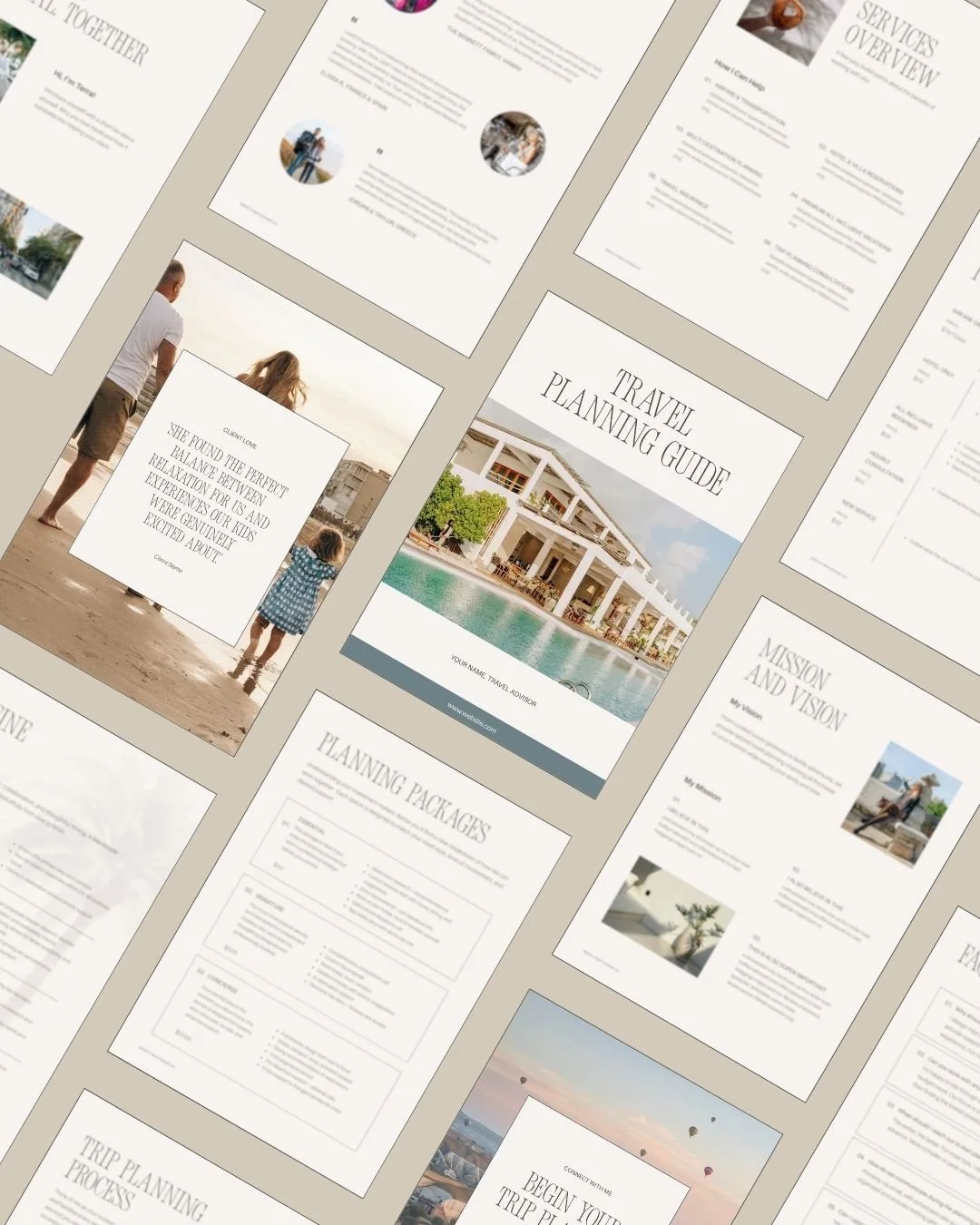
Welcome &Service Guide
A professionally designed, editable Canva template created specifically for travel advisors who want their client experience to feel as elevated as the trips they design.
Start every client relationship with clarity and confidence.
So, What Route Should You Take?
Here's what I'd tell you depending on where you are right now. Obviously, there are a lot of factors, but here’s the Coles notes.
If you're just starting and the budget is genuinely tight:
Carrd as a placeholder while you get your business established. If you're already paying for Travefy for the workflow tools, lean on their web presence in the interim. Either way, set a real date, six months, a year, to build something you actually own. Put it in the calendar. (Seriously. Calendar it. 'Someday' is not a date.)
If you want to maintain your own site without hiring a developer every time something needs to change:
Squarespace> Not the flashiest answer, but it's the right one for a lot of advisors. The Core plan handles everything most service-based businesses need, you can update it yourself, and it looks genuinely good.
If design really matters to you and you have some design confidence (or you're working with a designer):
Squarespace > Work with a designer whose aesthetic you like to achieve the look you want. Out of the box, it can be difficult to achieve what you may be inspired by. Also, be sure to check out Squarespace designer-made templates if you’re on a budget. These are pre-designed websites that take the initial ‘what do I put on this page’ out of the equation. Here are a few of my favourites.
Showit > Budget for at least the Basic Blog plan, because you'll want the blog for SEO. You can pair it with a Showit template or custom build and have something polished and cohesive.
And, if you need branding to go with either, check out Smeuse Studio's One Day Brand package, which gives you a full brand identity (logo suite, fonts, colours, brand guidelines) without the high four- or five-figure custom process. Save $100 by mentioning Birch & Bud Design Co if I don’t loop you in.
If you want maximum control and you have technical support:
WordPress > But go in with your eyes open about the maintenance, and have a plan for who handles updates, backups, and the inevitable plugin conflict at 9pm on a Tuesday.
If you genuinely want someone else to handle your marketing while you run your business:
Truevail gives you something consistent and professional. Just be honest with yourself about what you're renting (a presence) versus what you're building (equity).
If someone offers to build your primary website on Canva:
Politely decline.
For what it's worth, I build on Squarespace. It's what I know deeply, it's what I trust, and it's what I recommend to most of my clients because it sits in the sweet spot of design quality, maintainability, and real SEO capability without the maintenance. That's not the right answer for everyone, but it's the honest one.
Where to Go From Here
If you want to still be building toward something that works for you in three years — a site that ranks, attracts the right clients, and actually feels like something you’re proud to share — then the decision you make now matters. Not because one platform is magic, but because building on something you own, with tools you can actually use, compounds over time in a way a rented presence just doesn’t.
If you want to explore what a Squarespace website would actually look like for your business, what it would need, which approach makes sense, and what the process looks like, let’s talk!
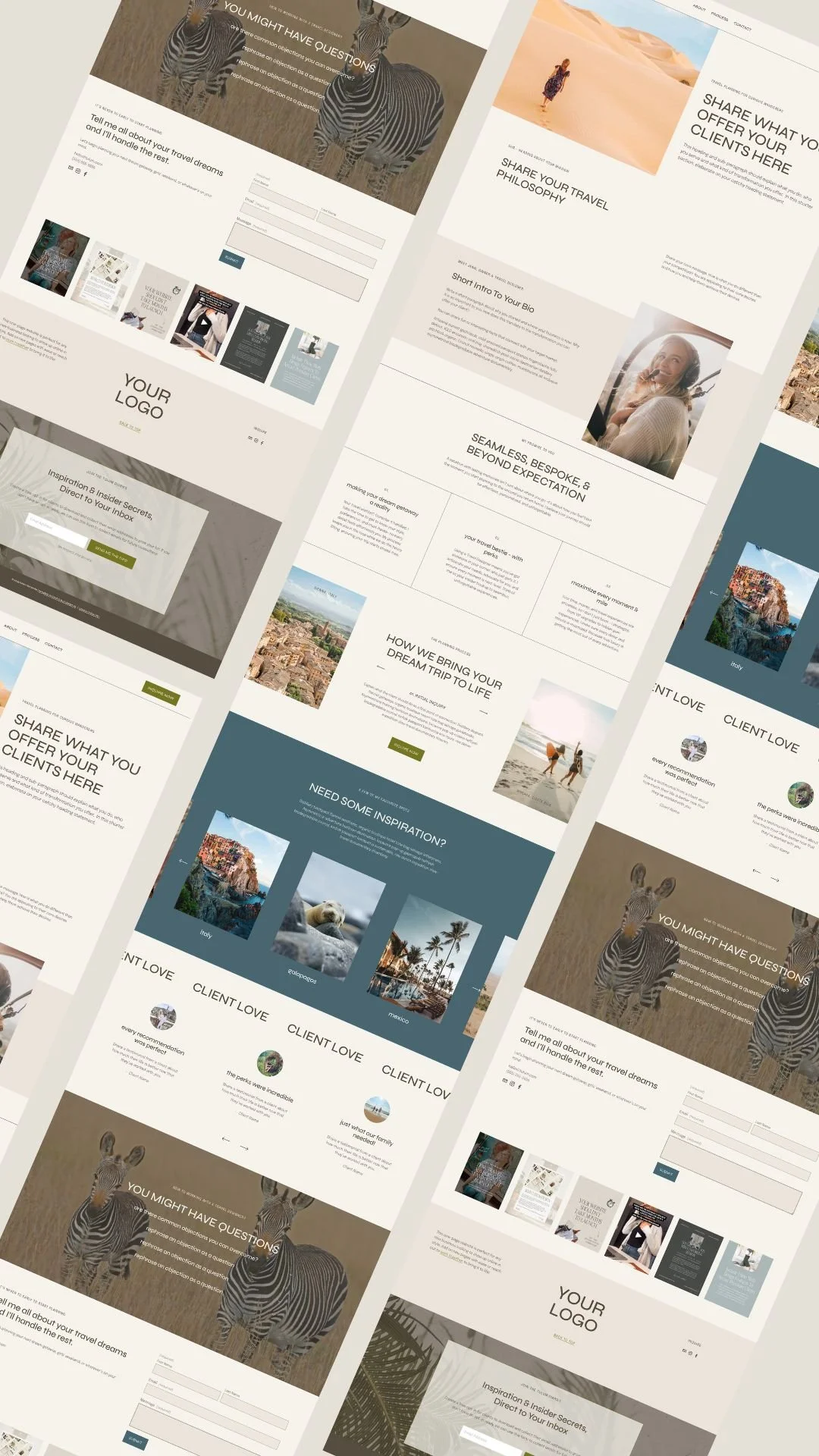






A real comparison of every website option a travel advisor is likely to run into, from travel-specific platforms like Travefy and Truevail to general builders like Squarespace, Showit, and WordPress, plus the quick-fix options like Canva and Carrd. We'll cover what each one actually costs (USD and approximate CAD), what you own versus what you're renting, SEO, ease of use, and how to figure out what makes sense for where you are right now.